Article
Customizations that survive an upgrade
The difference between a change that costs you once and one that costs you every release.
 John Pereira · PresidentMay 2026
Every shop that has run an ERP for more than a few years has customizations. Some of them are the reason the system fits the business. Some of them are the reason the business has not upgraded since 2017. The difference is not how clever the customization was. It is where it lives.
The two kinds of change
A customization that modifies the vendor's own code, forms or stored procedures has to be found, re-applied and re-tested on every release. It costs you every time, and the cost grows because the people who wrote it leave. A customization that sits alongside the system, calling its API, reading its database or hanging a new form next to the stock one, usually survives an upgrade untouched. It costs you once.
Most shops have both and do not know which is which until the upgrade project starts.
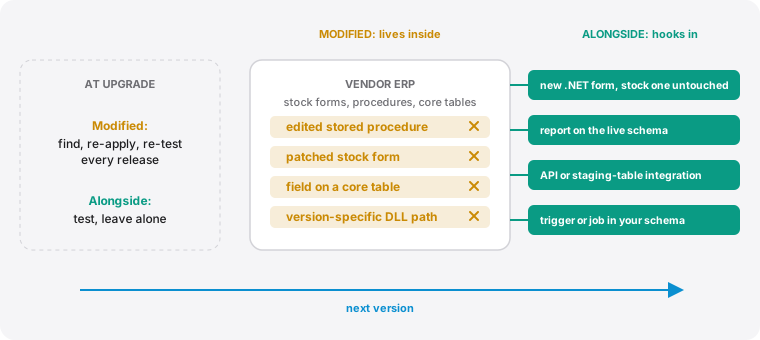 Inside the vendor's code or beside it. Where a customization lives decides what it costs at the next version.
What survives
- New forms, not altered ones. A separate .NET screen for the job in question instead of a patched stock screen. In Made2Manage this is the difference between a FastForms edit and a standalone form.
- Reports off the live schema. SSRS, Power BI and Crystal reports that query the tables directly. Vendors rarely rename core tables, and when they do it is documented.
- Integrations through the API or a staging table. EDI, label printing, CPQ sync and document distribution that hand data to the ERP the way the vendor intended.
- Logic in triggers and jobs you own. Database-side automation in your own schema or clearly named objects, not edits inside the vendor's procedures.
What does not
- Edits to the vendor's stored procedures, views or forms, however small.
- Fields added to core tables without using the vendor's extension mechanism.
- Hard-coded version-specific paths, DLL references or report connections.
- Anything nobody has written down.
The inventory
Before any upgrade we build one list: every customization, where it lives, who depends on it, and which of the two kinds it is. The first kind gets a plan: re-apply, replace with an alongside version, or retire. The second kind gets tested and left alone. That list is also the reason the next upgrade is smaller than this one.
If you cannot produce that list today, it is the first thing to do, and it takes less time than people expect. Most of the customizations that look scary turn out to be the surviving kind. The ones that are not are usually few, old, and replaceable.
More articles
Why your month-end report disagrees with the floor
Four common places a manufacturing close drifts from what the shop actually produced, and how to tell which one you have.
Map the process before you automate it
Automating a workaround just makes it permanent. A short argument for documentation first.
Made2Manage BOM and costing reports
Costed and exploded BOMs, a cost estimating system we built for quoting, and part availability across on hand, committed and on order.
Made2Manage tools we built
Communication Center, Workflow Management and Sales Order Import: three products we built to fill gaps in Made2Manage.
Made2Manage production reports
Four reports we built to show what the floor is building, where it is scheduled, who worked on it, and how the plant is performing.
Made2Manage quality reports
Two reports we built: one finds everywhere else a defect could be, the other shows which vendors deliver when they promised.
Made2Manage sales reports
Backlog, net bookings, commission liability and gross margin by order, including a bookings system we built for ERPs that cannot track bookings on their own.
Skills, tools, and your ERP: where AI should actually touch the data
AI gets useful in a shop when it is given the right things in the right order: written know-how first, live data through controlled tools second, and the power to change anything last.